Run your whole venue on one platform
CRM, front of house, POS, kitchen display, bookings, membership, payments and more — one real-time system for restaurants, bars and members' clubs. Every guest, booking and order flows through one traceable data model, so you can visualise it in seconds and make strategic decisions on data, not guesswork.
One platform, many modules
CRM, POS and more. Switch on what your business needs.
synapse is one product made of modules. A members' club usually starts with CRM; a restaurant or bar with POS. Combine them with front of house, kitchen display, payments and insights to suit the venue. Every module shares one database, one identity model and one real-time bus — so a member on the door is the same member on the bill.
For members' clubs
CRM
The whole member lifecycle — from application to renewal — and the door that greets them.
- 1
Members
Applications and vetting, plans and recurring dues, member records and cases.
- 2
Reception
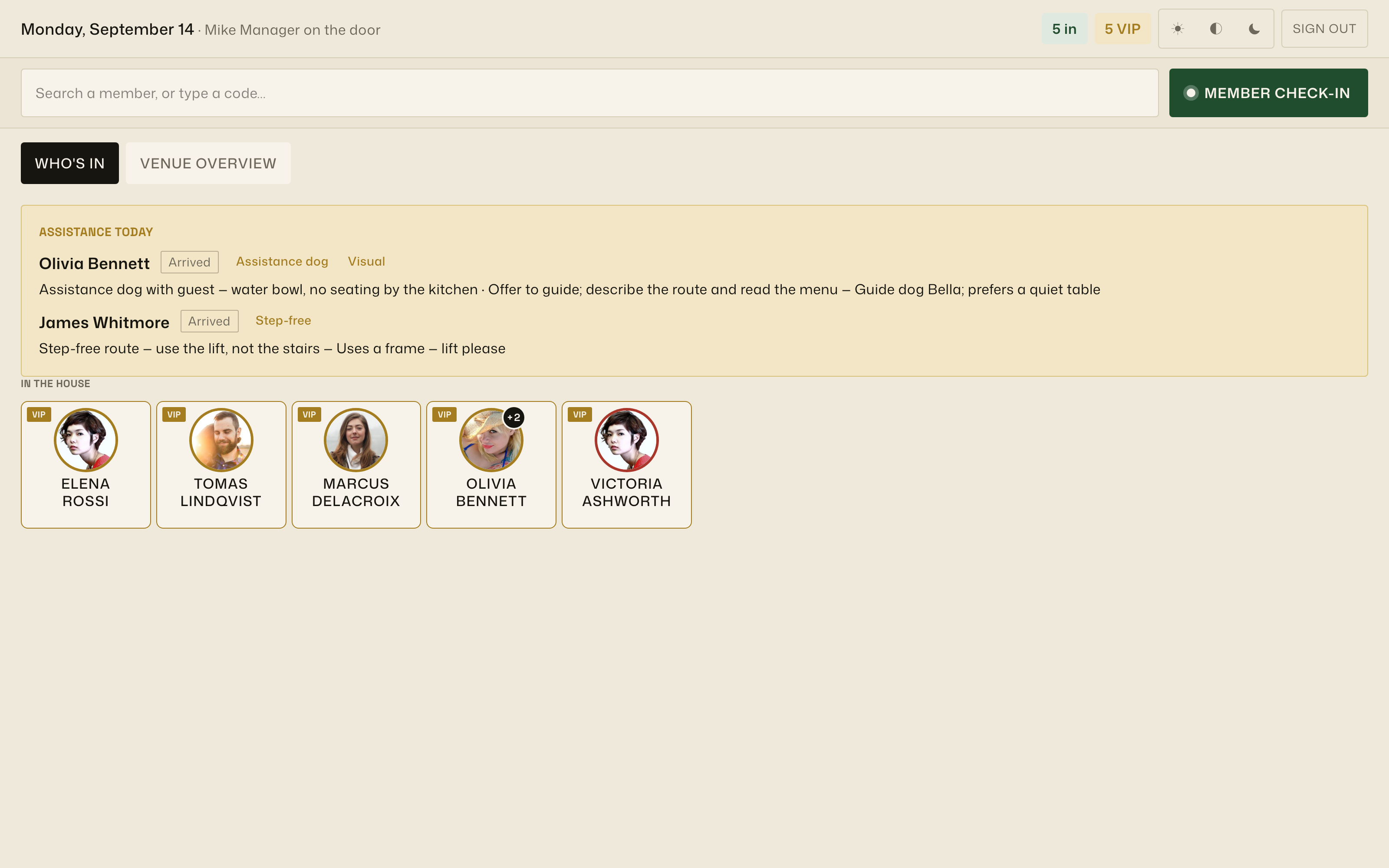
The front-of-house app on the door: who's in, check-in by NFC tap or QR scan, one-tap check-out, guests and cloakroom.
- 3
Engagement
Bookings, events and tickets, Apple & Google wallet passes, loyalty credit — and the emails, texts and WhatsApp messages that follow up on all of it.
- Billing with credit notes & freezes
- Direct Debit house accounts
- Email & SMS journeys
- Salesforce, SevenRooms, PeopleVine
- CRM reporting: growth, attendance, churn
For anywhere that trades
POS
One system to configure, a till to take the order, a screen to cook it. Pair it with CRM or run it alongside whichever modules the venue needs.
- 1
System
The back office: catalogue, recipes, stock and purchasing, floor plans and revenue centres, routing, discounts, reports.
- 2
Till
The iPad on the floor: checks, splits, discounts, tips and card-present payments — online first, with an offline option.
- 3
KDS
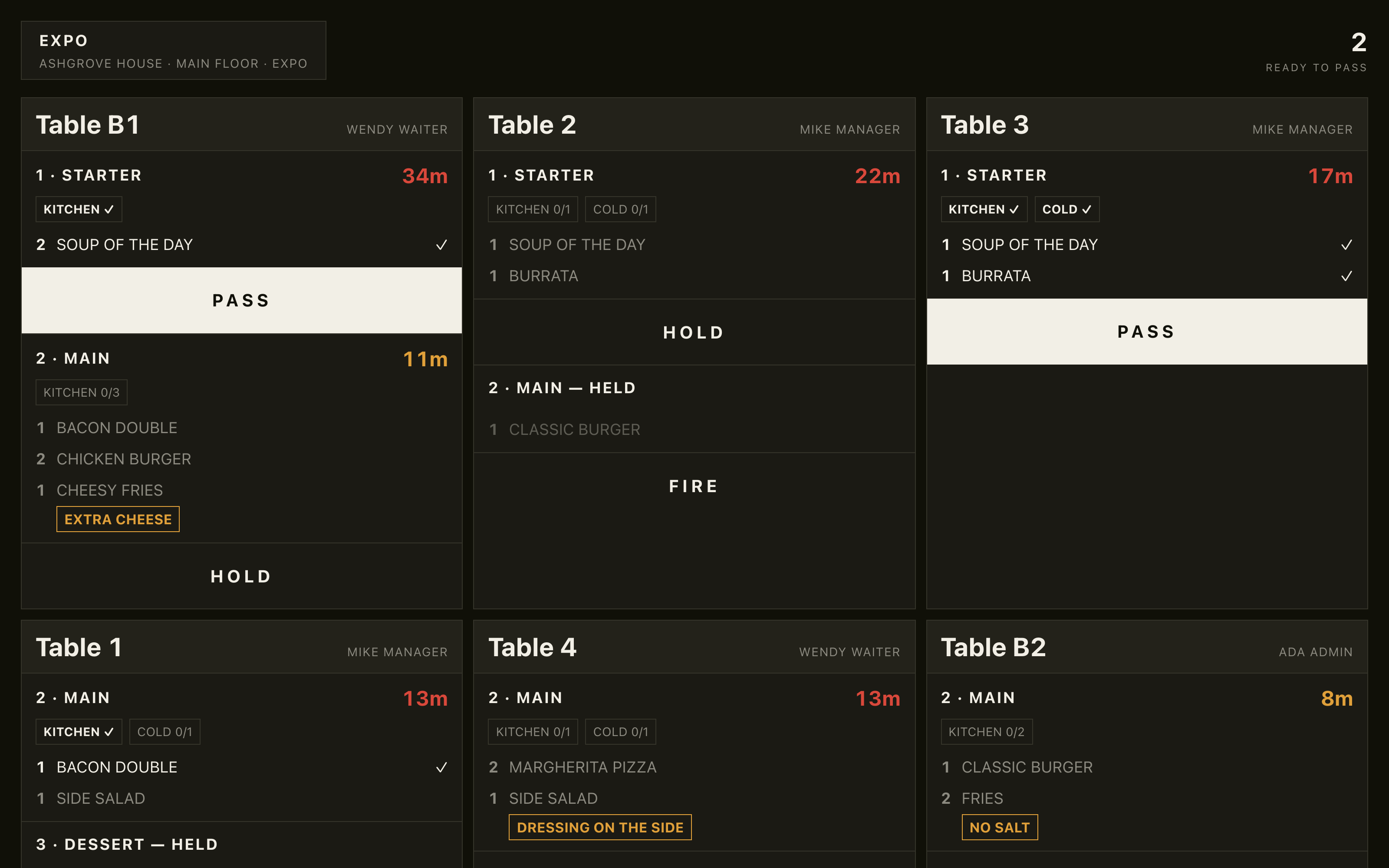
The kitchen display at the pass: a screen per station with course pacing, hold-and-fire and an expo view, paired like a till, bumped when food leaves.
- Card-present terminals
- Stripe & Adyen, marketplace payouts
- Sales insights: covers, spend, service
…and it's modular within each.
Switch floor plans, kitchen display, bookings, loyalty, passes or marketing on per venue — the configurator gates the rest until they're ready.
Marketing & messaging
Messages that know your members
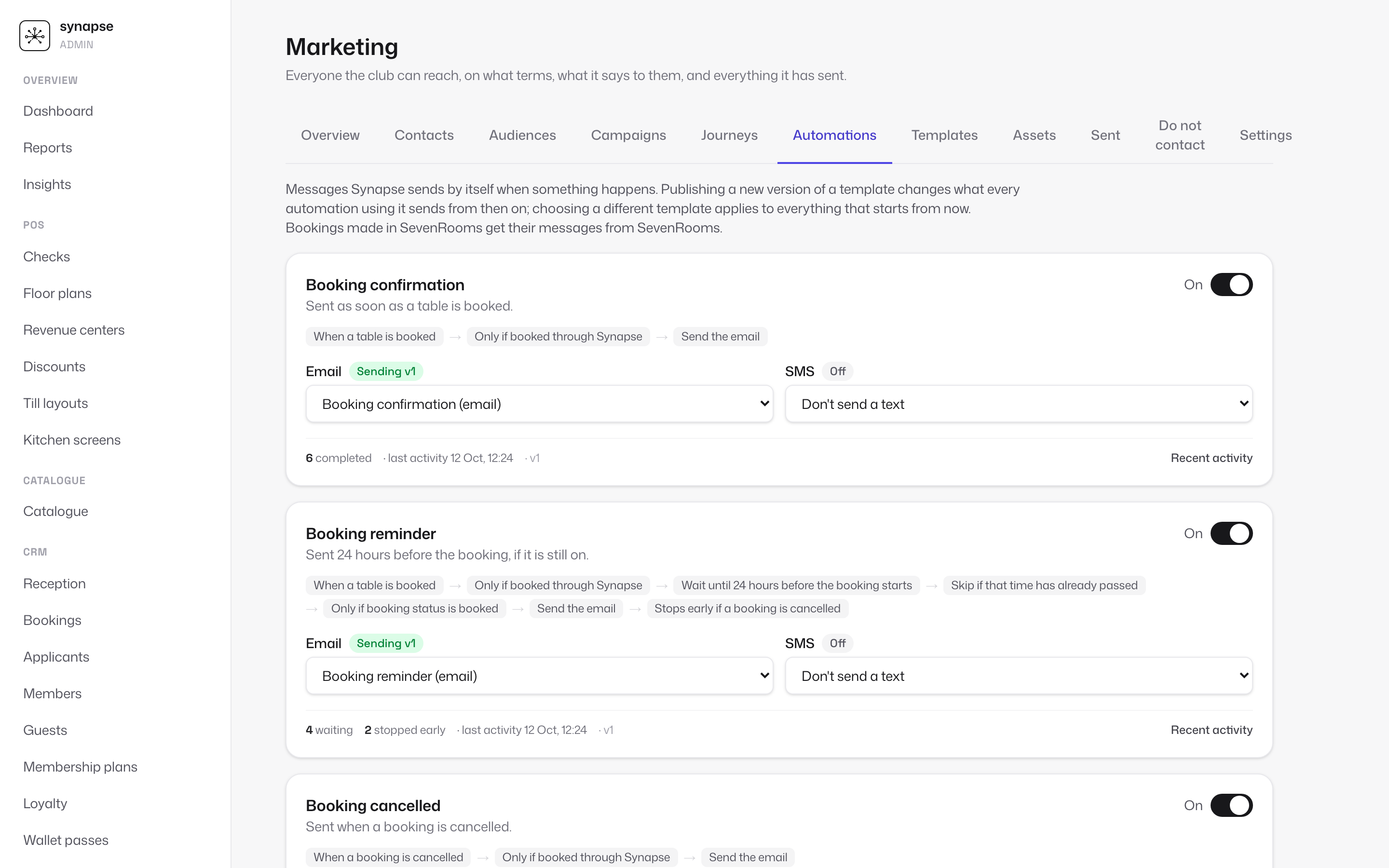
Email, SMS and WhatsApp built on the same member record as the door and the till. A confirmation the moment a table is booked, a reminder the day before, and journeys you draw yourself. Consent, unsubscribes and quiet hours are handled for you.
- booking.createdMon 11:02
- Confirmation emailed · deliveredMon 11:02
- Reminder due Thu 19:45Mon 11:02
- Still booked · not opted outThu 19:45
- Reminder texted · deliveredThu 19:45
Templates you design
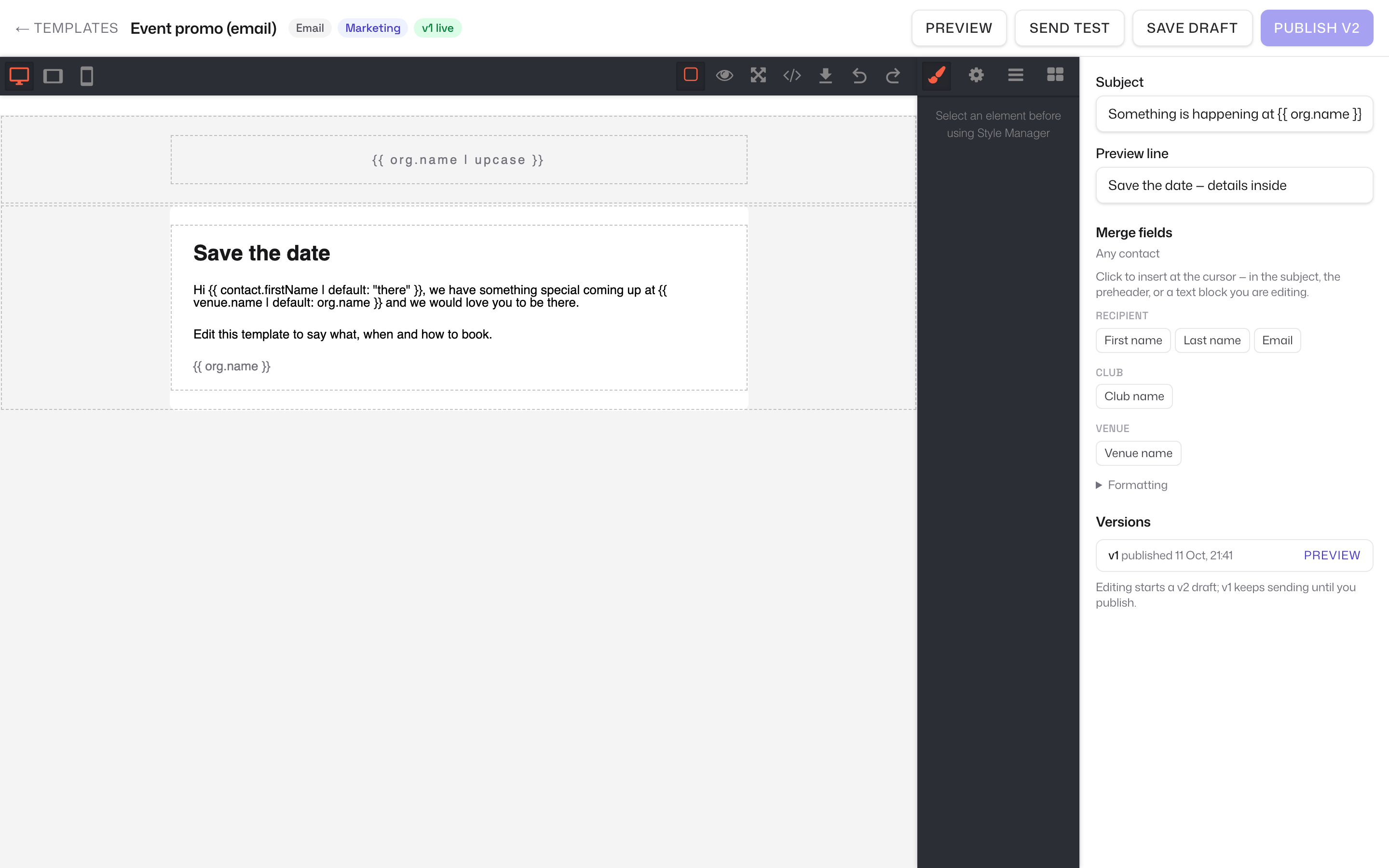
Drag-and-drop email in your own branding, SMS with a live character count, merge fields from the member record.
Audiences that keep up
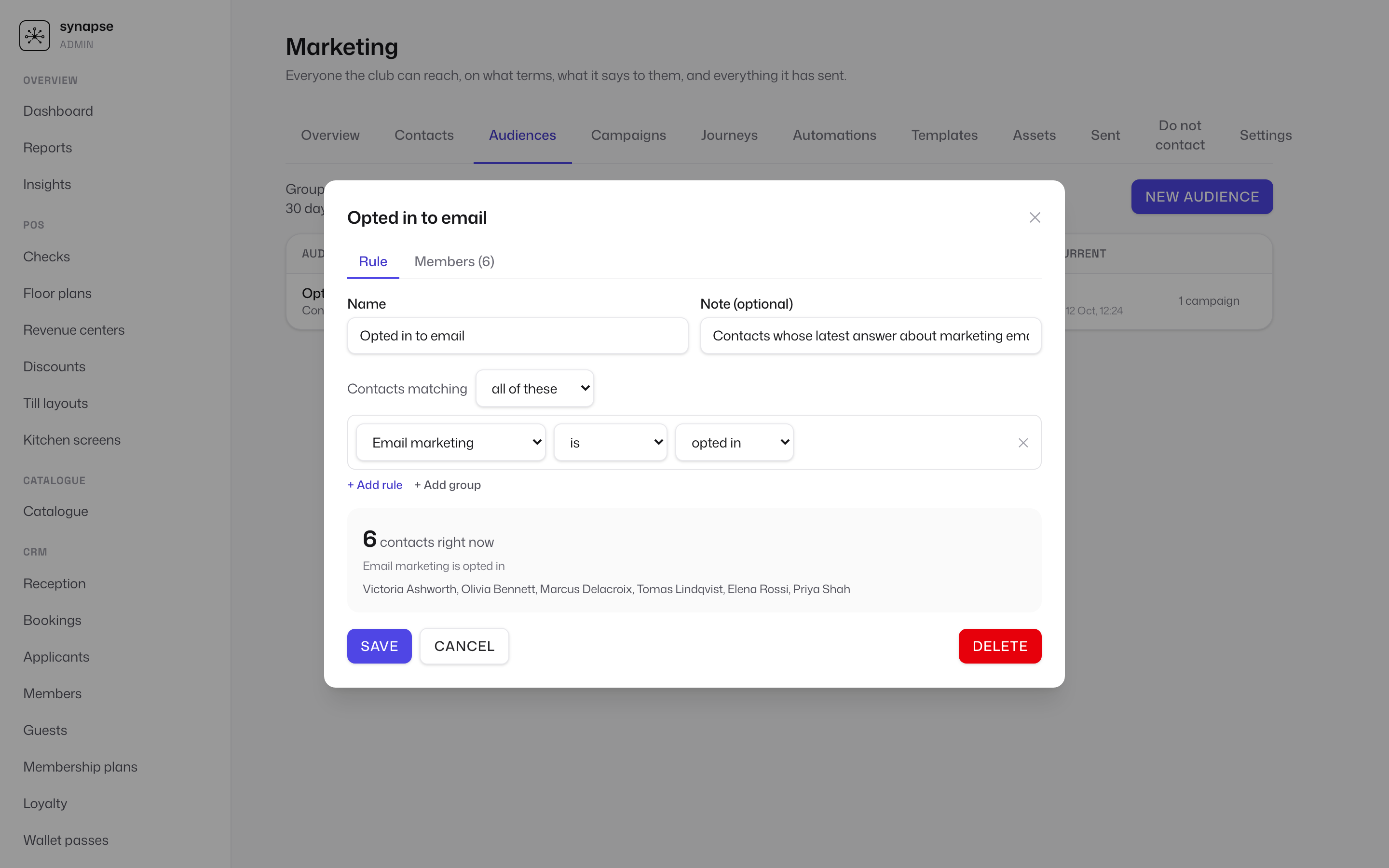
VIPs not seen in a month, everyone with a ticket for Friday — segments update themselves as members visit, book and buy.
Journeys with a plan B
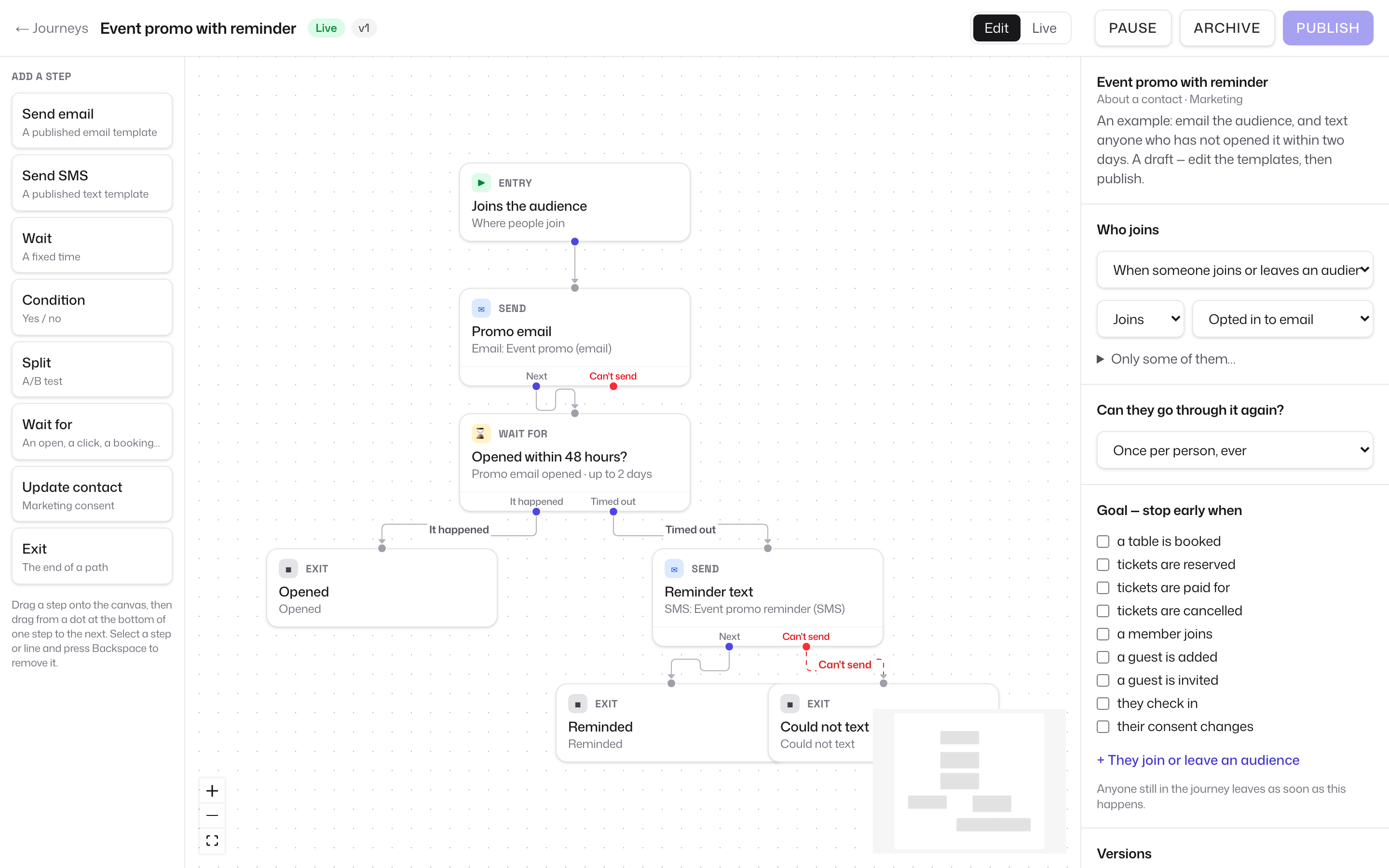
Wait, branch and split. Follow up by text if the email goes unopened, send the wallet pass by WhatsApp and fall back to SMS without an opt-in.
In the product
Live flows, not slideware
Screenshots from the synapse admin, with every number counted by the engine as it ran.
Membership billing
Dues that handle the awkward cases
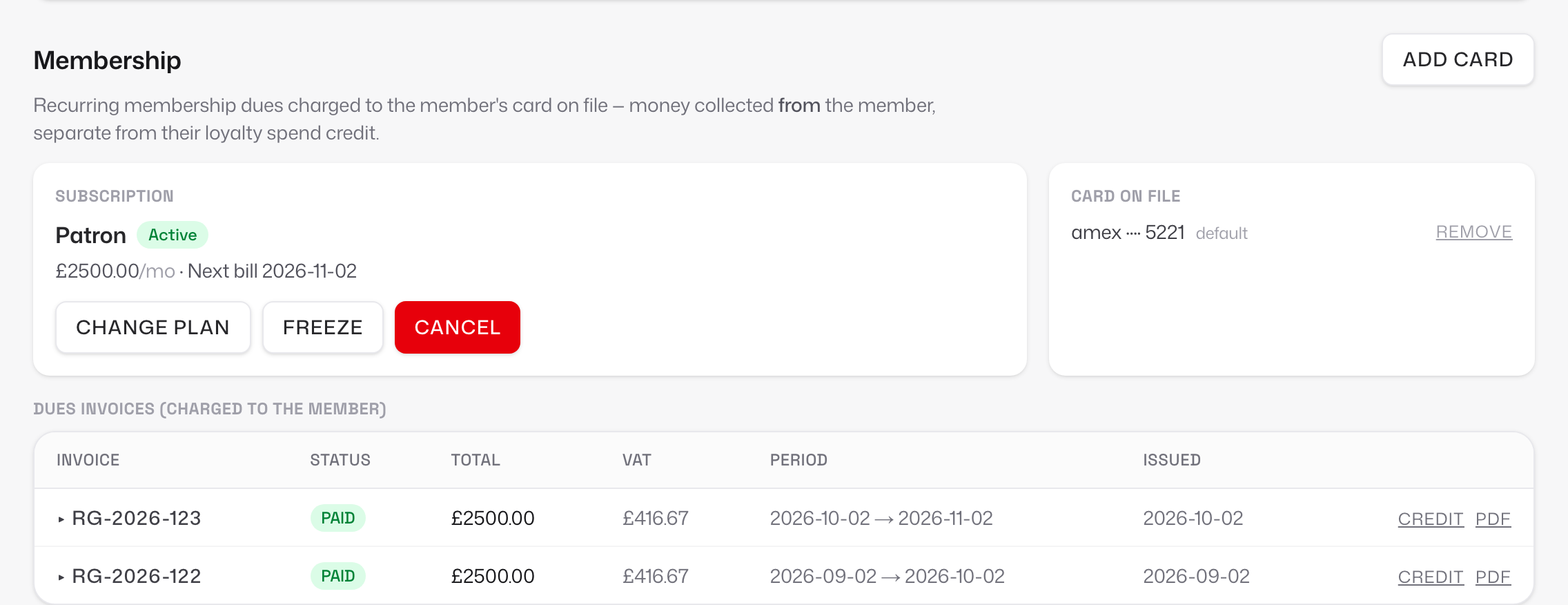
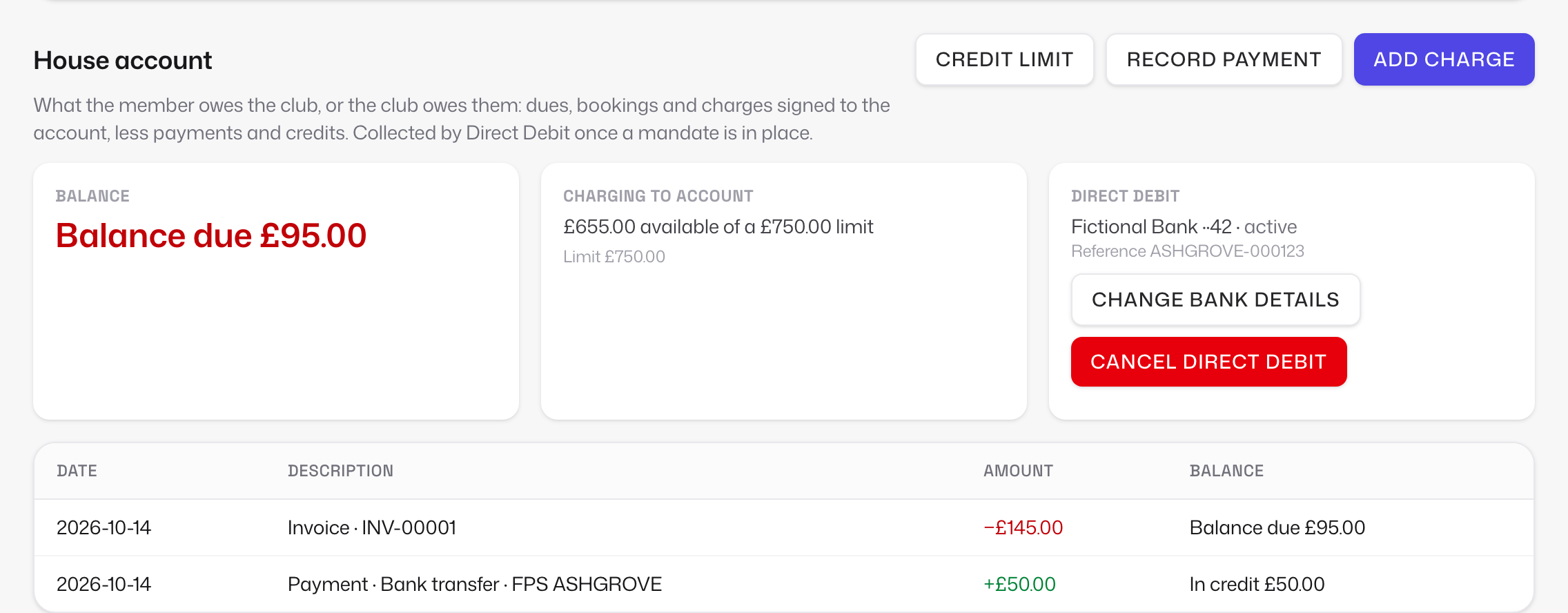
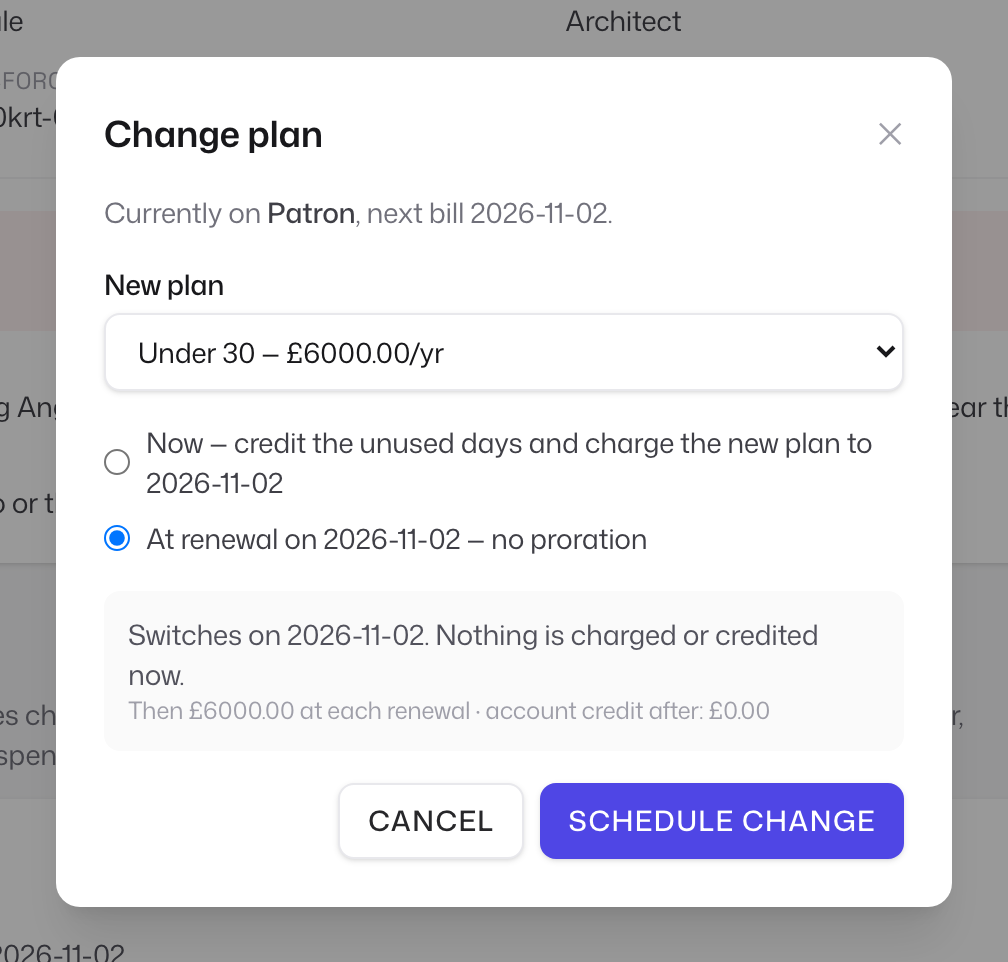
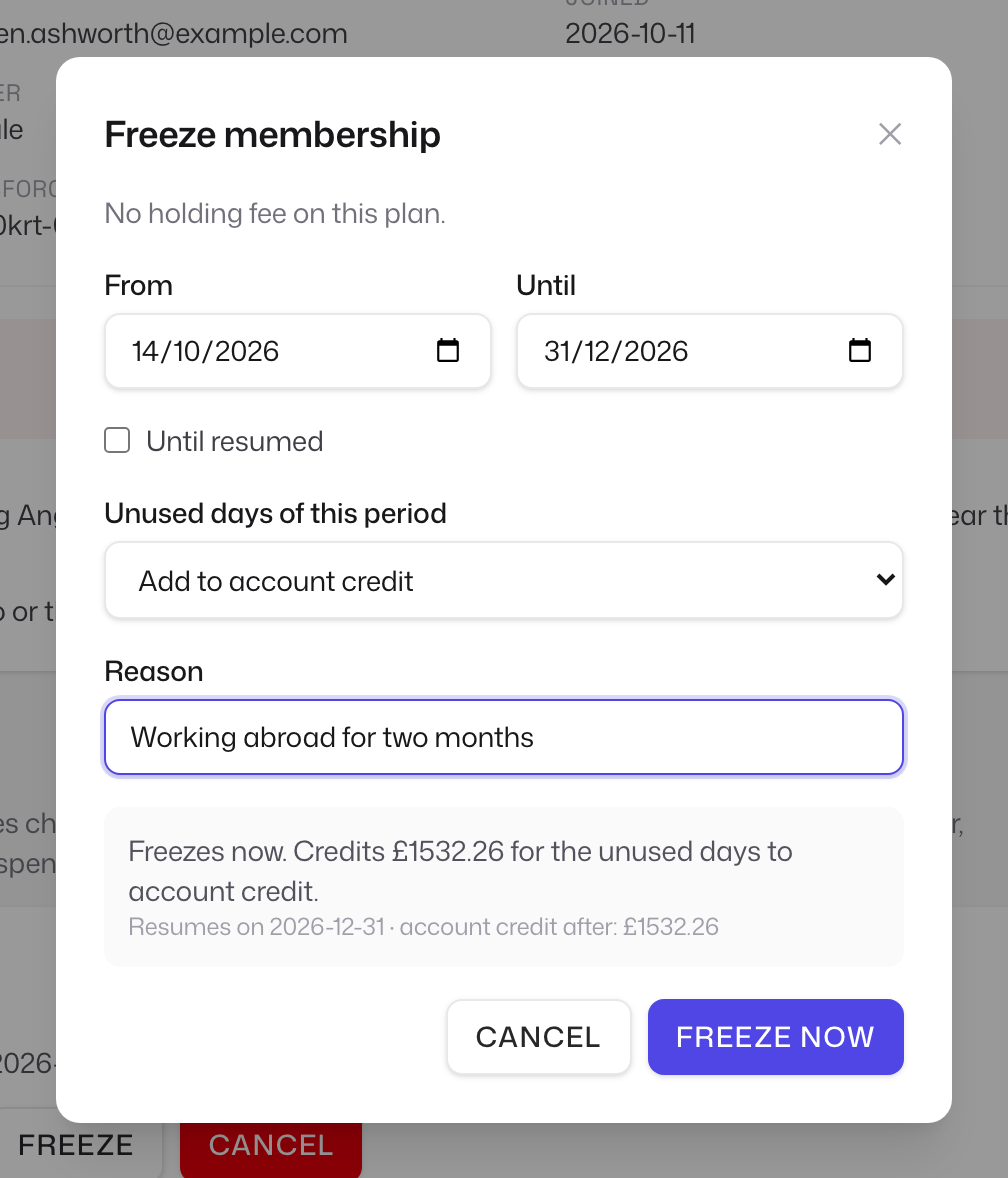
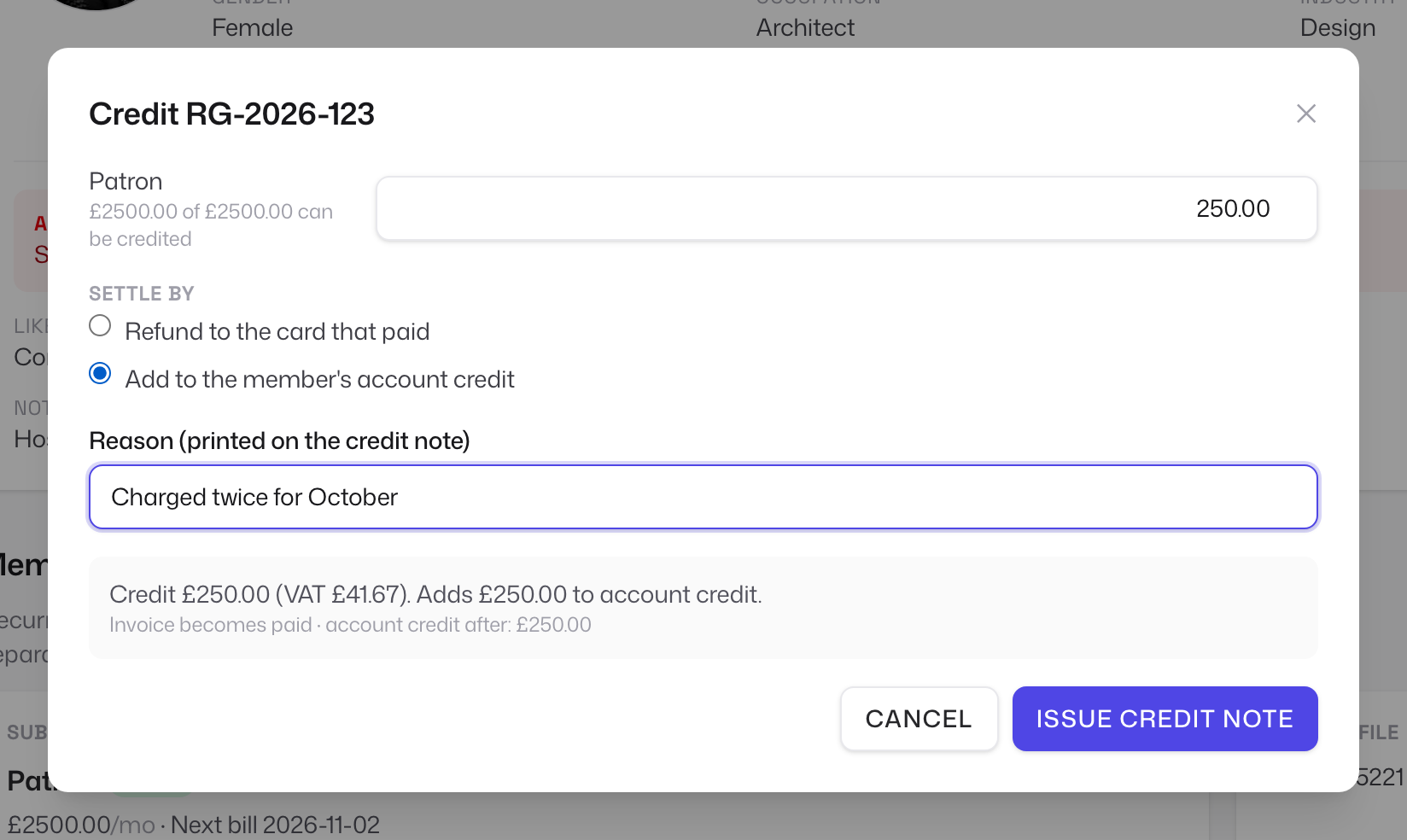
Members upgrade mid-month, go abroad for a season and get charged twice by mistake. synapse prices each of those before you confirm it, writes a VAT-correct invoice or credit note, and keeps one balance per member that Direct Debit settles.
VAT on every line
Plans and events carry their own VAT treatment and rate, so an invoice that mixes them still adds up for your accountant.
Credit notes and refunds
Credit any part of a paid invoice back to the card that paid it or to the member's account, with a numbered PDF.
Plan changes
Now, with the unused days credited and the new plan charged pro rata, or at renewal with nothing to work out.
Freezes
A date range or until resumed, an optional holding fee, a maximum per plan. Billing restarts on its own.
House accounts
One ledger per member with a credit limit: dues, bar tabs and bookings signed to it, payments and credits against it.
Direct Debit
GoCardless mandates set up from a link or a QR at reception. Collections and statements are next.
Wallet passes
The membership card is in their phone
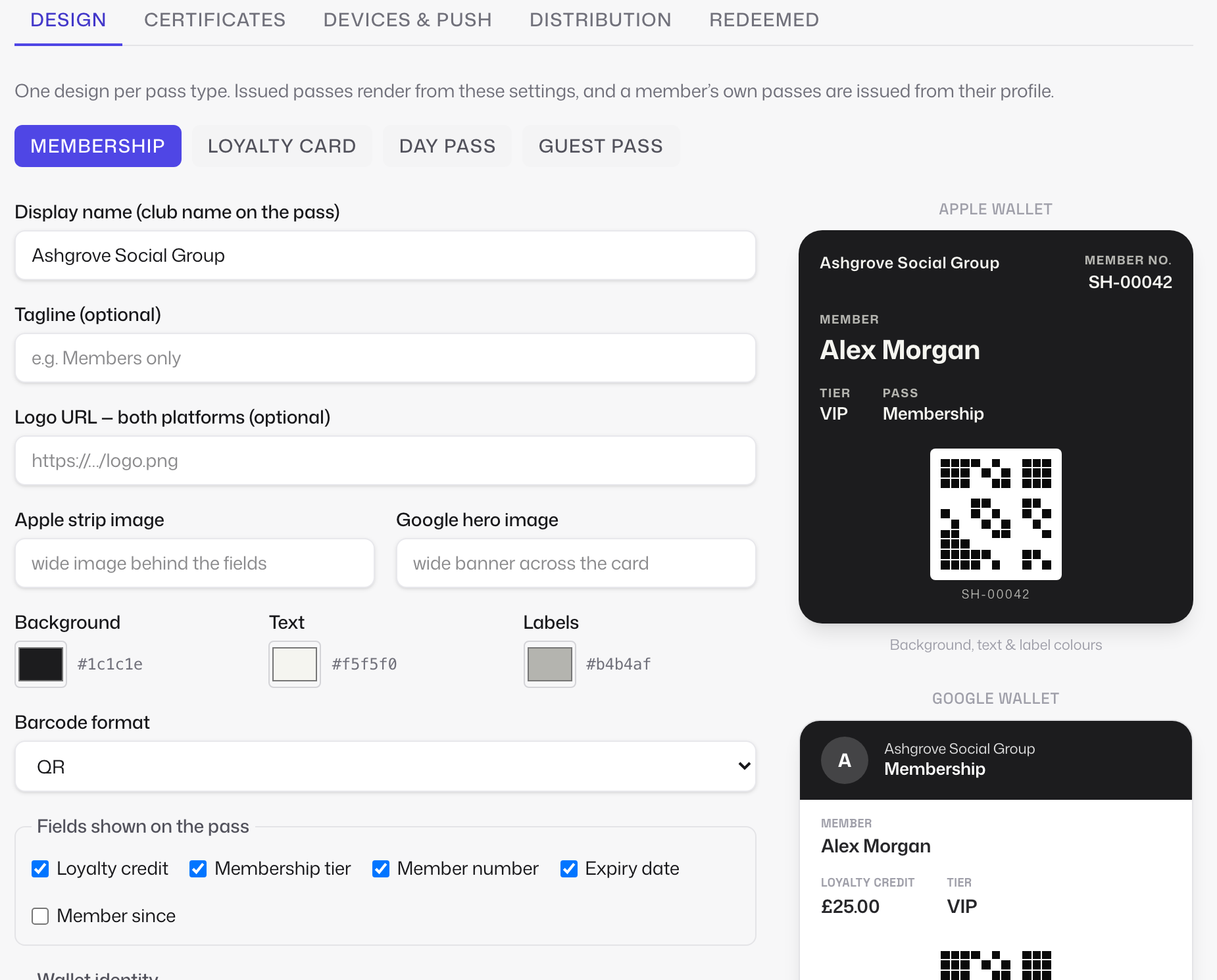
Design Apple and Google Wallet passes in the admin, issue them from the member's profile, and send one link that works on any phone. Sending it automatically by WhatsApp, SMS or email is being built now.
- One design per pass type. Membership, loyalty card, day pass and guest pass, each previewed as Apple and Google will draw it.
- One link per holder. The same URL opens the .pkpass on an iPhone and Google's save flow on Android. A desktop shows a QR to scan.
- Expiring, revocable links. Links last seven days and can be revoked; erasing a member revokes theirs.
- Kept up to date. Tier and loyalty credit change on the pass when they change on the record; the barcode checks the member in at the door.
Back office
Purchasing and the books, on the same record as the till
A purchase order becomes stock when it is signed for and a cost when the invoice matches it. Every sale is written once, signed, and rolled into a daily journal your accountant can trust. No spreadsheets in between.
Approved invoices export to Xero as a CSV today; the live connector posts them with the daily journal.
- ✓PO-0002 waiting for approval
- ✓Delivery FC-DN-7710 to match
- ✓FC-INV-30152 is £1.80 over PO-0002
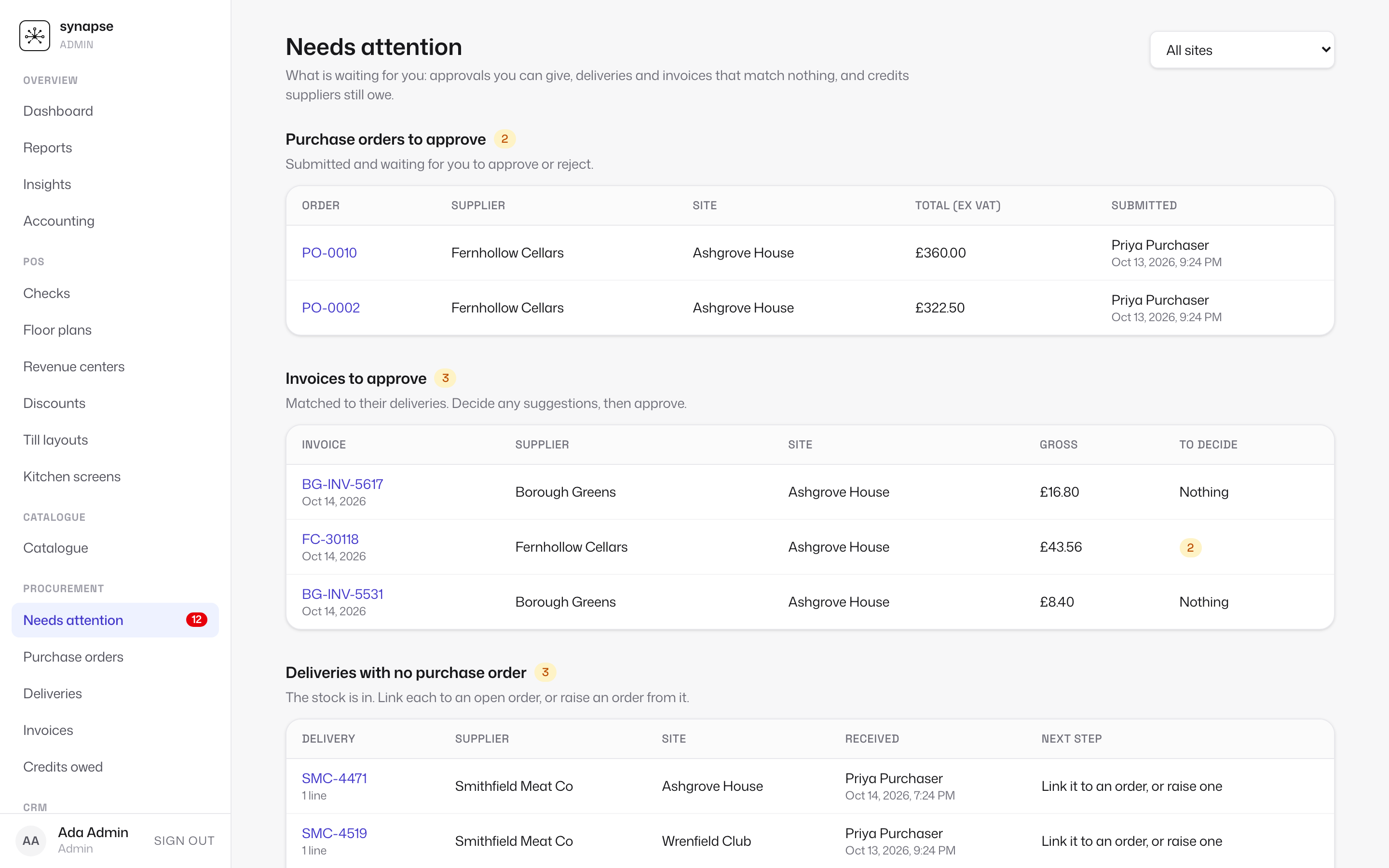
Unmatched deliveries and invoices, orders and invoices awaiting approval — one queue, cleared in the order they arrived.
A late change after posting raises an adjusting journal. Every account is mapped once, in the admin, and validated against your chart.
- DrCard clearing£188.01
- CrFood sales£106.04
- CrDrinks sales£50.65
- CrVAT output 20%£31.32
Procurement
Stock per site and a pack catalogue per supplier. Purchase orders go through your approval policy and straight to the supplier; deliveries update stock on signature; invoices match line by line, with credits tracked and a Xero CSV ready.
Accounting export
Every sale is a signed, append-only record by sales group and VAT treatment, on the trading day it belongs to. Connect Xero or QuickBooks, map your accounts once, and journals post automatically after a grace period.
House accounts
A ledger per member with a credit limit, charges and payments, so a tab at the bar and a ticket for Friday land in one place. Direct Debit mandates run through GoCardless; collections and statements are next.
A closer look
See it in action
The admin, from the same platform that drives the tills and the floor.
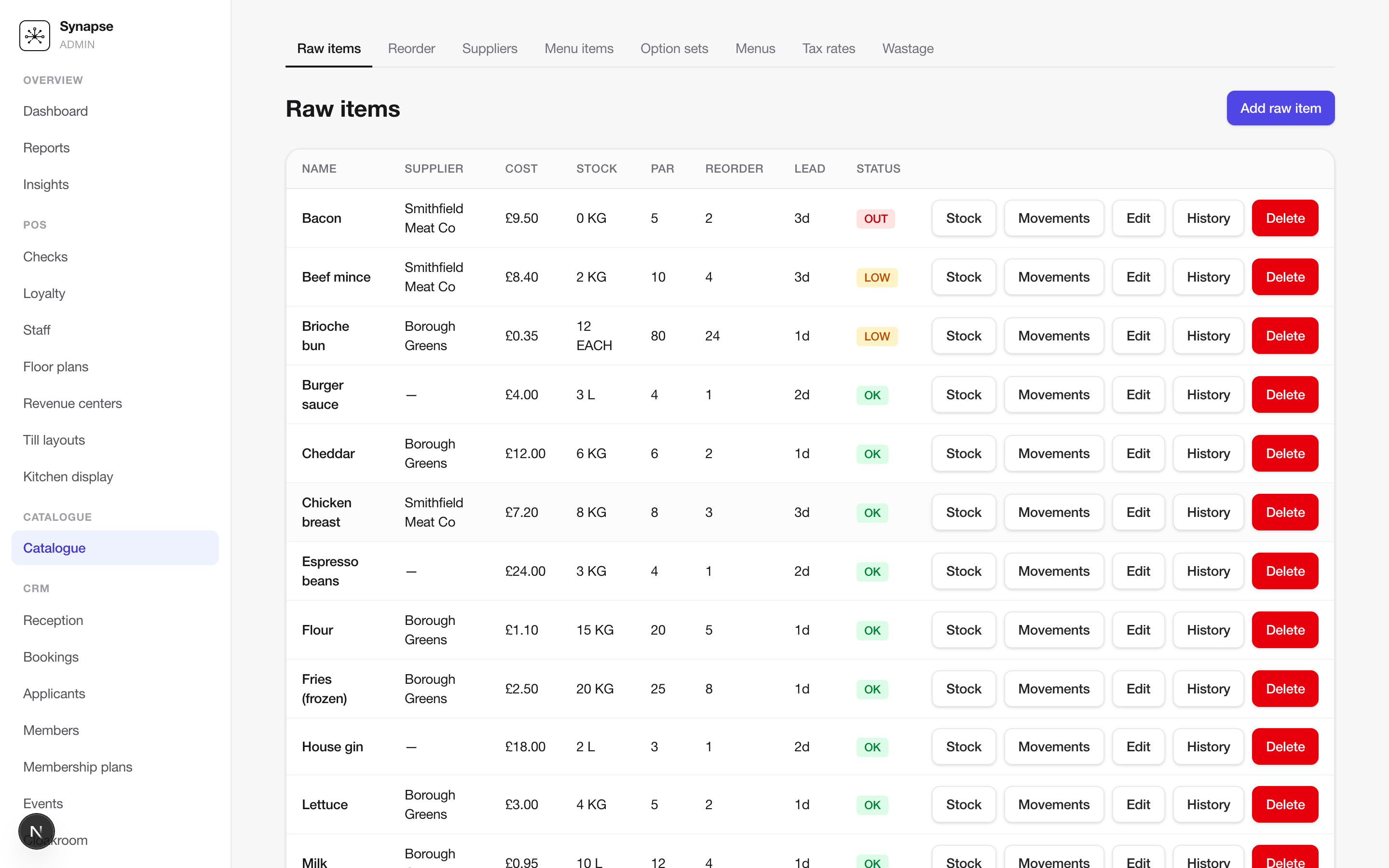
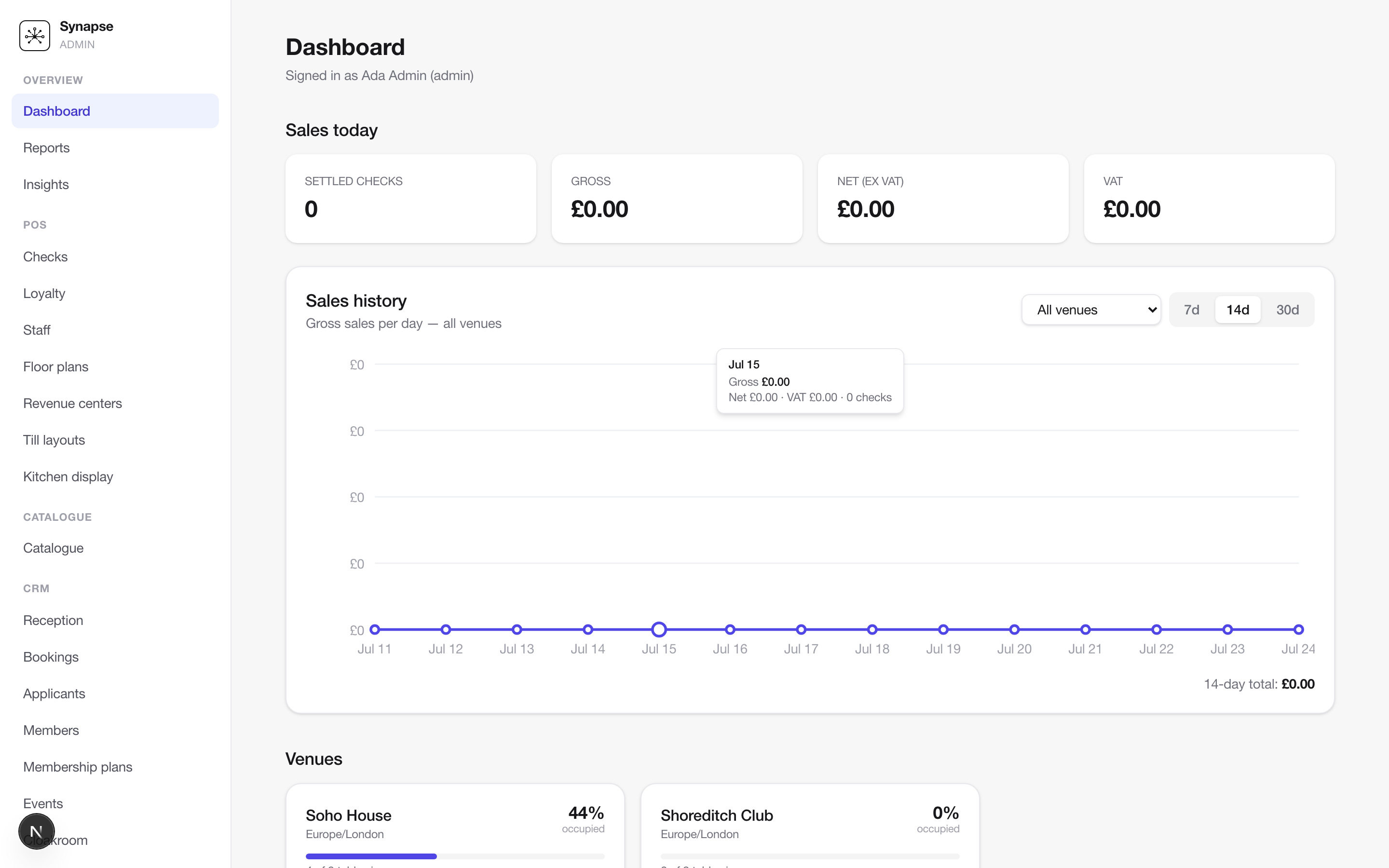
On the floor
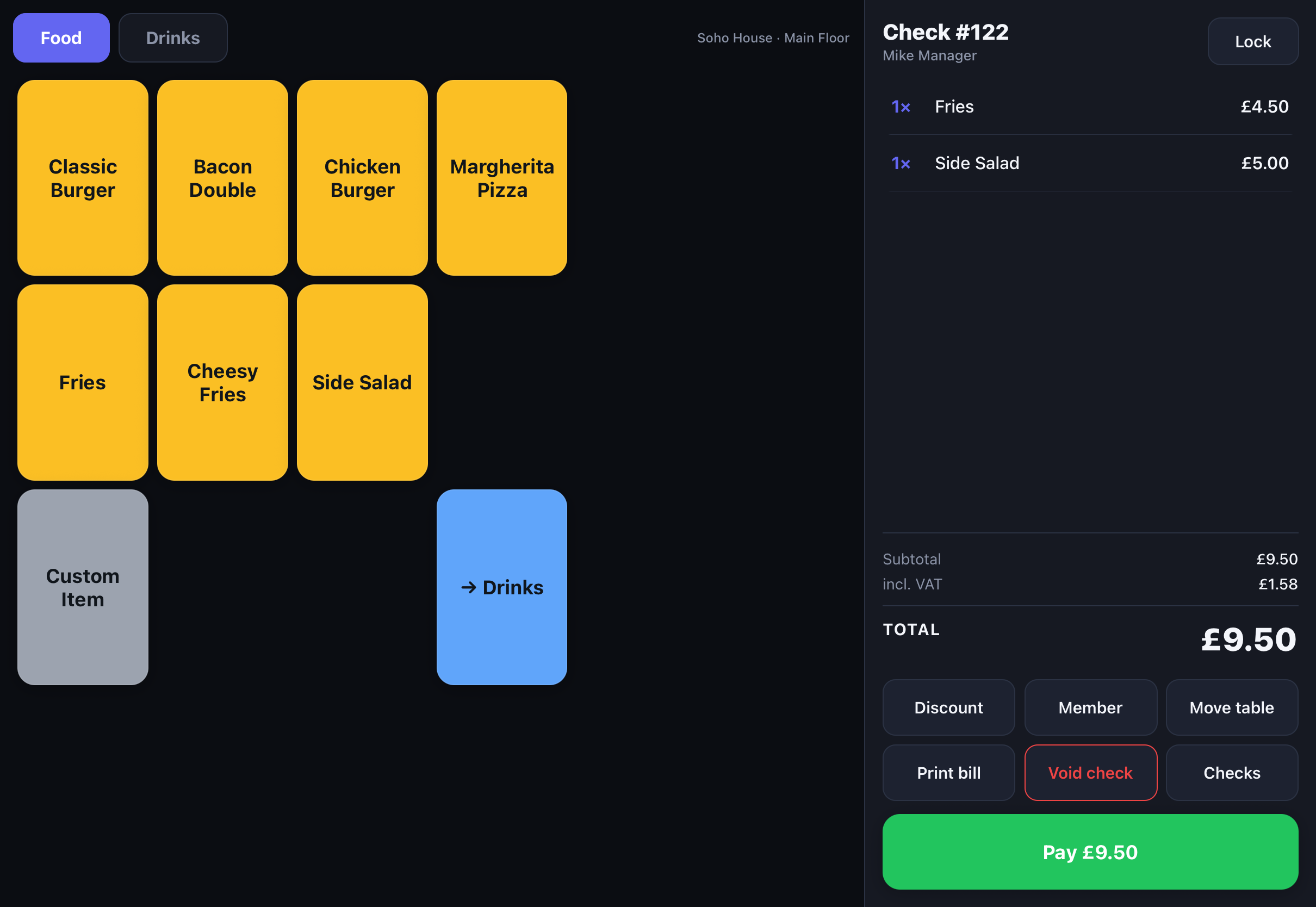
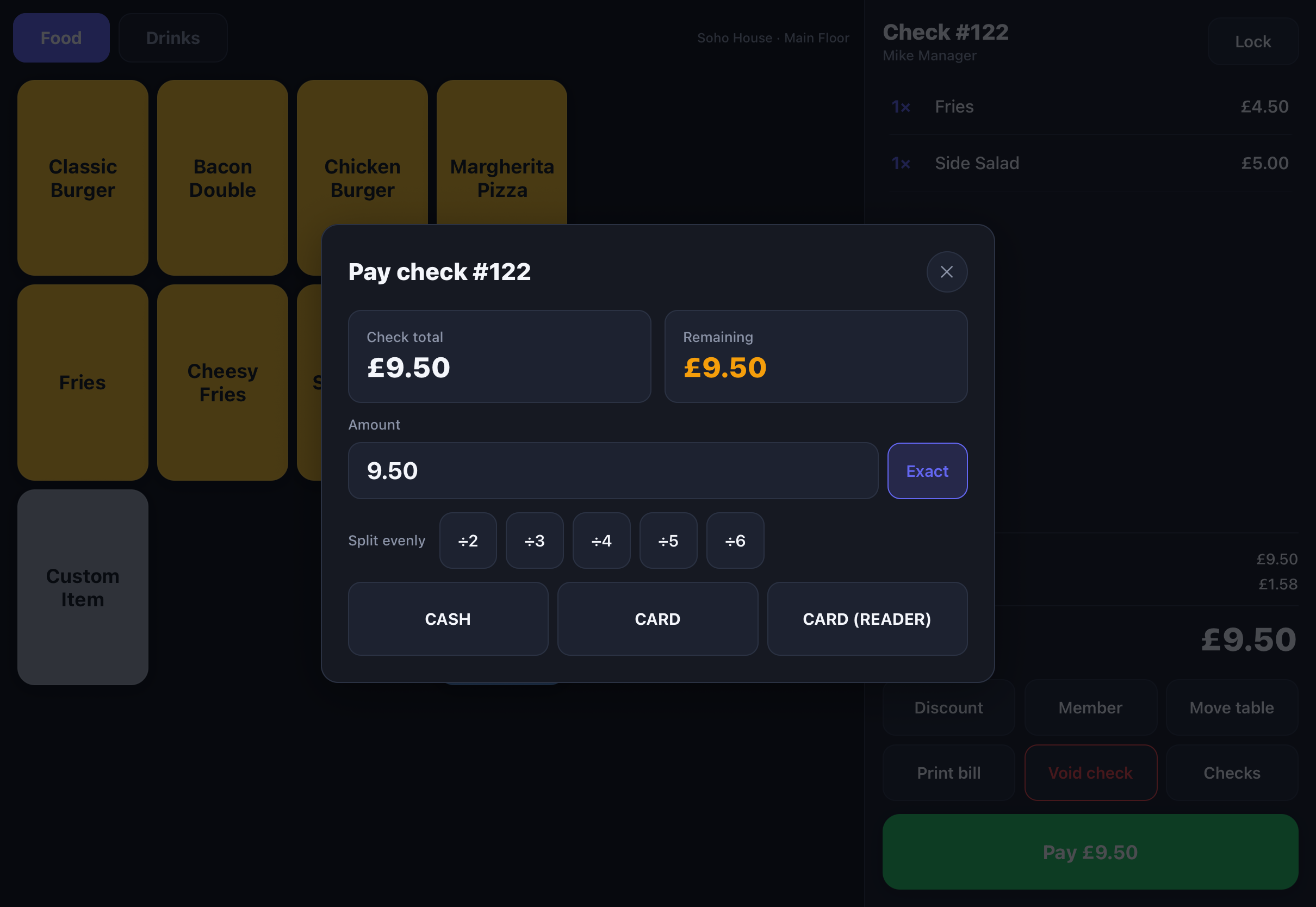
The iPad till
The same catalogue, prices and tax rules the admin manages — running natively on the floor and, with an on-premises server, still ringing up sales when the internet drops.
At the pass
The kitchen display
Any screen on the wall becomes a pass: registered once, then it comes back on its own. Tickets, not loose lines — aged by colour, paced by course, bumped when the food leaves.
On the door
Front of house
Reception sees who is in, who needs a hand tonight, and checks members in by NFC tap or QR scan — the same member record the bill will land on. Members and their guests check out with one tap, so the board is always right and every visit is on record: who came in, with whom, when, and when they left.
Hardware
Runs on the devices you choose
Tills on iPads or Android tablets, the kitchen display and the door on any screen with a browser, printers and card readers that venues already know. Keep what works, replace only what doesn't.
We don't sell hardware.
No bundles and no lock-in. We advise on what works best with synapse for your rooms and your service, and you buy it from your usual supplier. Rather not source it yourself? We can broker it for you. And if a venue needs something we don't support yet, we build the integration.
Till
Runs on an iPad or an Android tablet. Landscape, full screen, paired to its venue with a one-time code.
We recommend
- Any recent iPad
- Android tablets, 10" and up
- A stand or enclosure that suits the bar
Kitchen display
Runs on a wall-mounted TV with a mini PC, a touchscreen, or a tablet. Paired once, then it comes back on its own.
We recommend
- Touchscreens for bumping
- TV + mini PC for the wall
- Tablets for small sections
Front of house
Runs on a PC (with a camera added), a phone or a tablet. The device's own camera scans QR passes, so no extra kit is needed to start; Bluetooth or USB cameras can be attached for QR reading too.
We recommend
- iPad or Android tablet
- A phone at the door
- A PC with a USB camera
Door readers
Members tap their Apple or Google Wallet pass on an NFC reader that types the code into the door board — USB on a laptop, Bluetooth on a tablet, no drivers. Any keyboard-mode scanner works the same way.
We recommend
- VTAP NFC readers
- USB or Bluetooth QR scanners
Printers & cash drawers
Receipts and kitchen chits go to thermal printers on the venue network, routed by station. The cash drawer opens through the receipt printer.
We recommend
- Epson TM and Bixolon SRP series
- 80 mm or 58 mm paper
- Ethernet or Wi-Fi
Card readers
Card-present payments on smart readers paired from the admin and driven from the till — chip, contactless, Apple Pay and Google Pay, with the tip added on the till first.
We recommend
- Stripe: WisePOS E, Reader S700
- Adyen: V400m, S1F2 and other terminals
Something else on the floor?
Label printers, customer-facing displays, a reader your acquirer insists on, kit you already own — tell us what you run and we'll tell you what works, broker what's missing, or scope a custom integration.
Live, not a slideshow
Watch a service run
The room filling up and a check being settled — the same data your admin, tills and front-of-house all share, updating in real time.
One system of record
Follow the data
A real order as it moves through the platform: priced, discounted, settled, banked and attributed to the member. Every figure is computed with the same money math the till and API run on.
- BookingBK-3F9Q2M · 19:45
- Event2 × Wine Tasting — Rhône
- FloorMain Floor · in 19:39
- TableTable 4 · Window
Built for the floor
The details that keep operations running
The operational depth other platforms bolt on as integrations is native here — from the pass at the door to the chit in the kitchen.
Real-time data engine
Every write broadcasts a change. Admin, floor and till catch up in about a second.
Role-based control
Owners, managers, waiters and finance each see exactly what they should.
Online first, offline optional
Cloud by default. An on-premises server and a sync step keep a venue trading through an outage.
Configurable per venue
Turn modules, tipping, receipts and journeys on or off. The configurator gates the rest.
Everything a venue runs on
Native, not bolted on
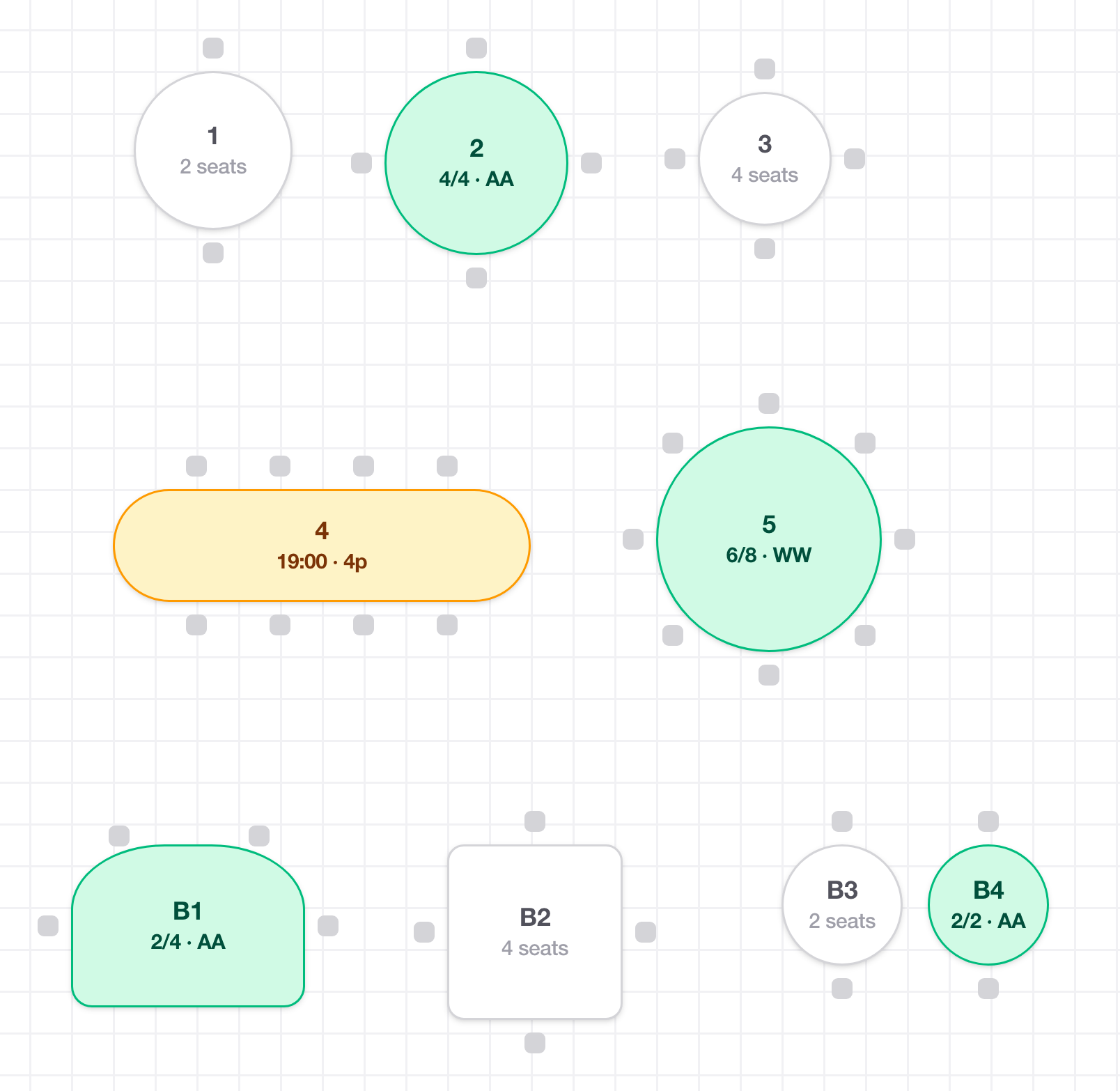
Floor plans & table service
Design rooms, route orders by station, move tables and follow service in real time.
Bookings & availability
Member → table → date with live availability, covers and spend on every reservation.
Membership & billing
Plans and recurring dues with VAT invoices, credit notes, plan changes and freezes — member status driven by payment state.
Wallet passes
Design Apple & Google passes per organisation, then send each holder one link that opens the right wallet.
Kitchen & printing
KDS routing, ESC/POS chits and receipts, and a compliant electronic journal for every sale.
Events & cloakroom
Ticketing, invoices and QR cloakroom tags — the extras a members' club runs on.
Email, SMS & WhatsApp
Booking and ticket confirmations, reminders the day before, and journeys you draw — wait, branch, follow up if unopened.
Audiences & campaigns
Segments that keep themselves current — VIPs not seen in a month, everyone booked this week — and campaigns from your own designed templates.
Consent & deliverability
Opt-ins recorded with their wording, one-click unsubscribe and STOP, quiet hours, and sending from your own domain.
Purchasing & suppliers
Stock per site, supplier pack catalogues, purchase orders with an approval policy, receiving, and invoices matched line by line.
Accounting export
Signed sales records by sales group and VAT, a daily journal, and connectors for Xero and QuickBooks with your own account mapping.
House accounts
A ledger per member: credit limits, charges and payments, with GoCardless Direct Debit mandates set up by link or at reception.
Real-time by default
No refresh. No stale menu. No “push to tills.”
Every write publishes a change event over a lightweight stream. The admin, the front-of-house board and every iPad till subscribe — so a new item, a moved table or a settled check appears in about a second, with polling as the fallback if the stream drops.
- Edit a menu in admin → it's ringing up on the till.
- Open a check on the till → the floor plan reflects it.
- Change a plan or a config → every surface catches up.
Payments, built in
Take every tender, on any surface
Providers are configured per organisation and their credentials are encrypted at rest, so a group can run different acquirers in different venues.
Online and card-present via Stripe Terminal, with tips and refunds.
Adyen Terminal API for card-present, plus marketplace payouts.
Providers sit behind one interface, so adding another is an adapter, not a rebuild.
Integrations
Works with the rest of your stack
An extensive API gateway exposes every module upwards — to your own desktop and mobile apps, or to any system that needs the data. Checks leave synapse in an Oracle Simphony-shaped document, so anything that already consumes a POS feed can consume ours.
An extensive, versioned REST API with webhooks on every change, so your own desktop and mobile apps — and any upstream system — build on the same data the tills run on.
Members and applicants both ways, mapped onto your own objects.
Checks export in an Oracle Simphony-shaped document, with webhooks on every change.
Member passes issued and updated from the platform.
Secure sign-in built on current standards — OAuth2, OpenID Connect and enforced MFA — with SSO for your team.
Daily sales and billing journals posted to your own account mapping, or as a file.
Direct Debit mandates for house accounts, set up from a link or a QR at reception.
Amazon SES for email, Twilio for SMS and WhatsApp — from your own domain and number.
Events and banqueting — same check-export shape as SevenRooms.
API
Open in both directions
Bring members, reservations and events in from the platforms you already run, and serve every module back out to your own apps and partners — REST today, GraphQL next, with webhooks so nobody has to poll.
Inwards
Consume what your other platforms already hold.
- SalesforceLive
Members and applicants, both ways — OAuth, a field mapper over your own objects, and a sync engine that never echoes.
- SevenRoomsLive
Venues, clients and reservations in; every check out, so spend lands on the guest profile.
- TripleseatComing
Events and banqueting in, on the same pattern as SevenRooms.
synapse
One service layer
Every route — yours, a partner's, the till's — passes the same validation, permissions and audit.
Outwards
Serve your data to your apps and partners.
- REST APILive
Every module — members, bookings, events, checks, menus, reports — versioned, with an OpenAPI reference.
- Webhooks & eventsLive
Signed callbacks when a check opens, changes or closes; a domain-event outbox behind every booking, ticket and member.
- POS feedsLive
Checks and reservations as Oracle Simphony-shaped documents, so anything that reads a POS feed reads ours.
- GraphQLIn progress
A read plane for composed views — a check with its table, member and totals in one query.
- Partner APIIn progress
/public/v1 with scoped keys, idempotency, cursor pagination and per-key rate limits — the foundation is built, resources are rolling out, OAuth for installed apps follows.
GET /v1/bookings?status=BOOKED
Authorization: Bearer <token>

[
  {
    "id": "cmv55zeip007nbdpvl0dvg9gn",
    "tableNumber": "3",
    "memberName": "Olivia Bennett",
    "partySize": 2,
    "startsAt": "2026-10-15T18:45:00.000Z",
    "status": "BOOKED",
    "source": "INTERNAL",
    "spendMinor": null
  }
]
Solutions
Built for every kind of venue
Pick your venue to see what you’d run — then add or remove modules to suit.
Restaurants
Table service, covers and a kitchen to keep in step.
Switch modules on or off at any time — the configurator gates what a venue isn't using, so nobody pays for a kitchen display they don't have.
Onboarding
Live in days, not months
Import & configure
Load your menu, rooms and members. Switch on the modules the venue needs.
Train the floor
Tills, floor plan and front-of-house board — the team is running live in a shift.
Go live
Payments connected, passes issued, insights flowing. Open the doors.
Enterprise-ready
Secure and compliant from day one
Auth, encryption, auditing and data-subject tooling are built in — not a later project.
Roadmap
Where synapse goes next
From a complete venue platform to a member-facing, developer-facing, certified product. Sequenced by dependency, so every phase ships something a venue or a partner can use. Each item says where it stands; anything without a badge is planned, not promised.
Phase 1
Foundations
Reach members without a staff member holding the phone.
- WhatsApp and pass deliveryIn progressWhatsApp is live as a channel, and each holder gets a link that opens the right wallet. Next: sending it from the profile with a WhatsApp → SMS → email fallback, then issuing to a whole plan.
- Billing adjustmentsIn progressVAT invoice lines, credit notes and refunds, plan changes now or at renewal, and freezes with holding fees are live. Next: a fixed billing day per plan.
- Accounting exportIn progressXero and QuickBooks connectors, account mapping and the daily sales and billing journals are live, with VAT reported by treatment. Supplier bills and card payouts follow.
- ProcurementShippedPer-site stock, supplier packs, purchase orders with approval, receiving, invoice matching and a needs-attention queue.
Phase 2
Member-facing
A home for the member, deep-linked from their wallet pass.
- Member portalBook, buy tickets, see the bill and top up credit — a web app, no app store.
- Passwordless sign-inA magic link by SMS or email.
- Bookings & events v2In progressTicket tiers, holds, waitlists, deposits and no-show fees. The services layer is in; tiers are next.
- Member accounts & Direct DebitIn progressThe house-account ledger and GoCardless mandates are live — set up from a link or a QR at reception. Collections and statements follow, then dues and bookings charged to the account.
- Tap to PayAny staff phone as a card terminal; pay at the table.
Phase 3
Developer-facing
Partners and a venue's own apps build on the same data.
- Public REST APIIn progress/public/v1 foundation built — scoped keys, idempotency, cursor paging and rate limits per key. Members, bookings, events and checks next.
- GraphQL read planeIn progressMember 360, a booking with its spend, an event with its tickets — one query.
- Webhooks v2In progressMany endpoints per club, signed envelopes, retries and replay.
- Docs, sandbox, SDKsEverything a partner needs to ship without a call.
Phase 4
Intelligence & trust
Answers from the venue's own data, and the certificates buyers ask for.
- AI insightsQuestions in plain language, automatic reports and forecasts.
- Kitchen displayShippedCourse pacing, hold-and-fire and an expo view.
- SOC 2 Type II, then ISO 27001Most controls already exist in code; the programme does the rest.
Inbound order ingestion and a native member app come after the public API and the member portal they depend on.
Ready to run your venue on synapse?
A 30-minute walkthrough of the admin, the floor and the till — with your menu, your rooms and your membership.
- A live tour of the admin, floor plan and iPad till
- Your own menu and rooms loaded in, not a canned demo
- Straight answers on migration, pricing and timelines
Request your walkthrough
Tell us about your venue and we'll set up a session that fits it.